Get SOC 2-ready without the spreadsheet.
Nata checks your controls against the tools you already use, keeps the evidence your auditor will ask for, and tells you what to fix next.

Who it’s for
Your first SOC 2
A customer asked for your SOC 2 report and you don’t have a compliance team. Nata gives you controls mapped to SOC 2, twelve policy templates to start from, and checks on your code host and identity provider from day one.
A small security team
You already run a security program, but the evidence lives in spreadsheets and screenshots. Nata collects it from your tools every day and runs your access reviews and risk register, so the time goes to security instead of proving it.
How it works
From connecting your tools to handing your auditor what they need. Screens from a demo organization.
Connect your tools
Connect your code host and identity provider with read-only access. Nata reads their settings and never changes them.
See which controls pass
Every control shows its status, the tools that check it and the policy that covers it. Nata re-checks every day and saves each result as evidence.
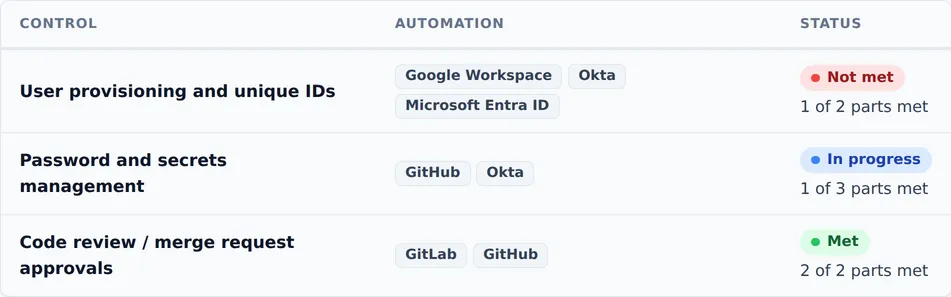
Each control lists the tools that check it, and its status counts the parts that pass. Fix what fails
When a check fails, Nata opens a task for the account or control that needs it and gives it to an owner. Fix the account in your identity provider, and the next sync closes the task.
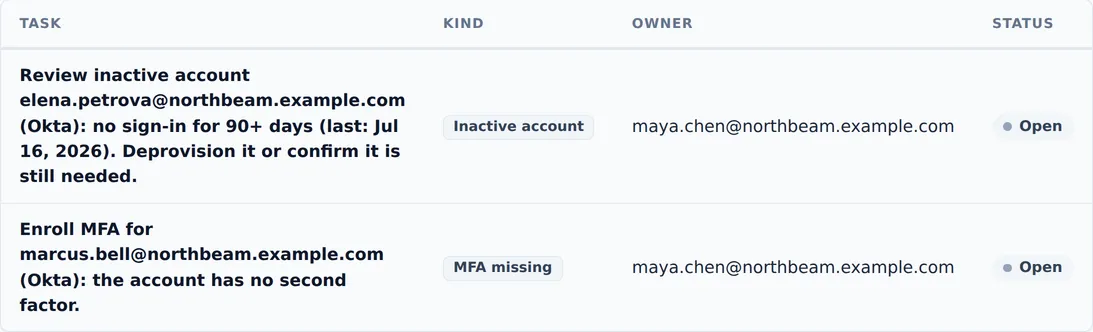
Two Okta checks failed, so Nata opened a task for each account and gave it to an owner. Hand it to your auditor
Give your auditor a read-only seat, and request an audit package for the audit period: controls, evidence with its files, the policies in effect, the activity log and a printable evidence index in one download.


Want to see these checks on your own tools?
Contact salesWhat’s automated
Nata reads from the tools it checks and never changes their settings. It sends only where you point it: alerts to a Slack channel, your activity log to your log collector, and, if you turn it on, one Jira issue per task, closed when the task is done.
GitHub
Branch rules, code review, required checks, organization 2FA, code scanning, Dependabot and secret scanning.
GitLab
Branch protection, merge request approval rules and project membership.
Google Workspace
MFA enrollment, inactive accounts, leavers who still have access, and accounts nobody owns.
Okta
The same directory checks, plus sign-in policies: MFA required, password standard, idle session timeout.
Microsoft Entra ID
The same directory checks for Microsoft 365 organizations.
Jira
Changes approved before release with a rollback plan, a review after every incident, and security fixes within their deadline. Optionally, send Nata’s tasks to a Jira project.
Kandji
Your managed Apple devices, each checked: checked in within 14 days, FileVault on, a supported macOS or iOS version, and the macOS firewall on. Part of the Devices module.
Slack
Alerts in a channel when something needs attention.
Audit log webhook
Every entry of your activity log, sent to your SIEM or log collector within a minute, in Splunk, Datadog or generic JSON format. Never secrets or document contents.
Coming soon Amazon Web Services, Google Cloud, Microsoft Azure, Jamf and Microsoft Intune.
Checked every day
A few of the checks Nata runs against your connected tools, and the SOC 2 criteria each one supports:
- Default branches are protected, with required reviews and status checks SOC 2 CC8.1
- Everyone in your GitHub organization uses two-factor authentication SOC 2 CC6.1
- Every directory account has MFA, and no one has been inactive for 90 days SOC 2 CC6.1, CC6.2, CC6.3
- People who left no longer have accounts SOC 2 CC6.2
- Every account belongs to a person on your roster SOC 2 CC6.2
- Okta enforces a strong password standard SOC 2 CC6.1
- Vulnerabilities are fixed within their deadline, and code scanning is on SOC 2 CC7.1, CC8.1
- Dependabot security updates are on SOC 2 CC9.2
- Security training is current for everyone on your roster SOC 2 CC1.4, CC2.2
What else it covers
Everything an audit asks for that a tool can’t check, tracked in the same place.
Automate
- Daily checks of your connected tools, saved as evidence.
- Tasks that close themselves when the failing check is fixed.
- Reminders by email or in Slack for due tasks, policy reviews and expiring evidence.
Track
- Evidence freshness, so nothing quietly stops counting.
- Policies with versions and emailed acceptance links, from twelve SOC 2 templates.
- People and training: your roster and their security training.
- Risk register with likelihood and impact scoring and regular reviews.
- Access reviews of your identity provider, repositories, or any system you can export to CSV.
Prove
- Auditor seat: a read-only role for your auditor.
- Activity log: append-only, and you can export it.
- Audit packages for your audit period.
- “Not applicable” with a reason: recorded with who decided.
- Met needs evidence: no control can be marked met without it.
Built for security teams to trust
- No passwords. You sign in with a passkey or a single-use email link.
- Kept apart twice. Your data is separated from every other organization by the application and by the database itself.
- Read-only. Nata reads your tools and never changes their settings.
- No stored GitHub token. Each sync uses a token that expires within the hour.
Questions buyers ask
How long does setup take?
Setting up your organization takes a few short steps: confirm your email, choose SOC 2 and any extra categories, and Nata creates your controls, mapped to SOC 2. Each integration then connects in a few clicks. How long it takes to be ready for an audit depends on what you already have in place; the dashboard shows where you stand from the first day.
What access does Nata need?
Read-only access to the tools it checks. GitHub uses a GitHub App that reads repository and organization settings, GitLab uses read-only API scopes, and Okta uses a read-only administrator token. Nata never changes a tool’s settings, and sends data only where you point it: alerts to Slack and, if you turn them on, your activity log to your log collector and tasks to Jira.
Which frameworks does Nata cover?
SOC 2 today: the Security category, plus Availability, Confidentiality, Processing Integrity and Privacy if your report needs them. Each control also shows which NIST CSF 2.0 outcomes it supports.
Do I still need an auditor?
Yes. A SOC 2 report is issued by an independent CPA firm after its audit, and Nata doesn’t certify anyone. Nata helps you get ready and makes the audit easier: your auditor gets a read-only seat to see your controls, evidence, policies and activity log, and you can hand them an audit package for the audit period.
What happens to my data if I leave?
Your admins can download a full export at any time: controls, evidence and its files, policies, people, risks and the full activity log, as JSON and CSV. When you leave, we delete your organization: it’s suspended at once and permanently deleted after 30 days, and you can change your mind until then. You can also have evidence deleted automatically after 1 to 7 years.
How much does it cost?
Nata is priced per organization, and early customers get early-customer pricing. Email us for a quote.
See Nata on your own stack
Tell us a little about your company, your tools and your audit date. We’ll answer your questions and, if you’d like, walk you through Nata with your own tools. We reply within one business day.