What's new in Nata: Jira evidence, and Met now needs proof
The biggest change this week: Nata now connects to Jira Cloud and turns your change, incident and security tickets into SOC 2 evidence. We also tightened what Met means: a control needs evidence on file before anyone can mark it Met.
Jira tickets become change, incident and vulnerability evidence
If your change approvals, incident reviews and security fixes live in Jira, proving them to an auditor usually means a folder of ticket screenshots. Nata now reads that from Jira Cloud for you.
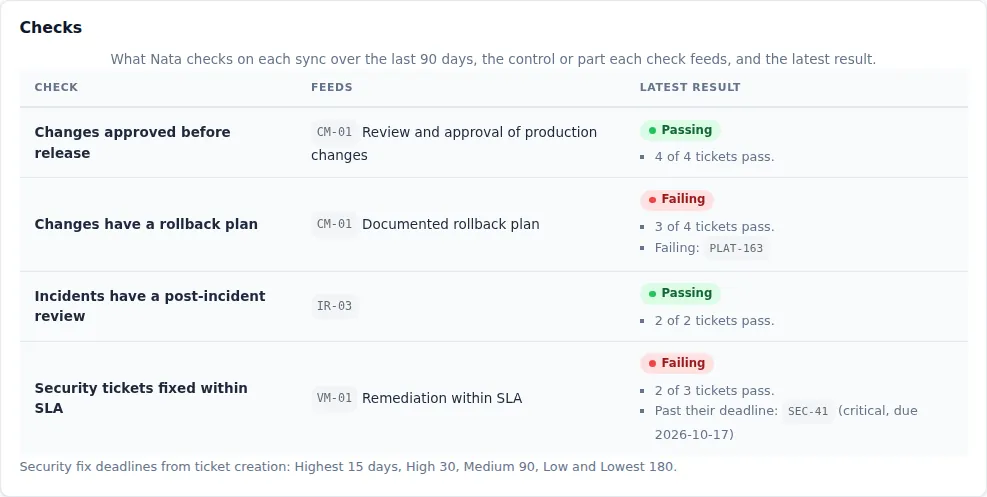
Your Jira tickets become pass/fail evidence for each control, with the exact tickets to fix.
An admin connects your Jira site from Integrations by signing in with Atlassian. Nata asks for read-only access, and you never type a password or API token into Nata. You then tell Nata how your workflow works: which projects to watch (up to 10), which issue type is a change, which status means approved and which means released, which field holds the rollback plan, how incidents and their reviews are recorded, and which label marks security tickets.
Every day Nata checks the last 90 days of tickets:
- Changes approved before release: every released change went through your approval status first (CC8.1).
- Rollback plan documented: every released change has the rollback field filled in (CC8.1).
- Incidents reviewed: every resolved incident has a post-incident review, as a filled field or a linked review ticket (CC7.4).
- Security tickets fixed on time: each ticket with your security label is fixed within the deadline for its priority: 15 days for Highest, 30 for High, 90 for Medium and 180 for Low. If GitHub is connected too, both have to pass (CC7.1).
Each result is saved as evidence with counts and the keys of failing tickets. Nata never stores ticket summaries, descriptions, comments or field values. When a check that passed starts failing, the control’s owner gets a task, and it closes itself once the tickets are fixed.
How to try it: connect your site on the Jira integration page, then choose your projects and statuses on the Jira mapping page.
A control needs evidence before it can be marked Met
A control marked Met with nothing behind it is the first thing an auditor will ask about, and until now Nata allowed it on controls without parts. Now Met needs proof there too, the same as it already did for parts.
When someone picks Met on a control with no evidence, Nata keeps the status as it was and points them to the evidence form on the same page. Any evidence counts: a file, a written note, a link or an integration result. Adding a note with “Update status to: Met” saves the evidence and sets Met in one step.
Controls already marked Met with no evidence keep their status. Nata never changes it on its own. They’re shown as “Met, no evidence” on the controls list, the control page, the dashboard and framework pages, and they no longer count as Met in your readiness score or requirement coverage. Each one gets a task to attach evidence, for its owner or your first admin if it has none, and the task completes on the next daily run after evidence is added. If a few “attach evidence” tasks appeared this week, this is why.
The result: your readiness number only counts what you can show an auditor.
How to try it: open Controls and look for the “Met, no evidence” label.
If you’d like to see any of this on your own setup, get in touch.